


Privacy
How to Use Social Networking Sites for Beginners



Privacy
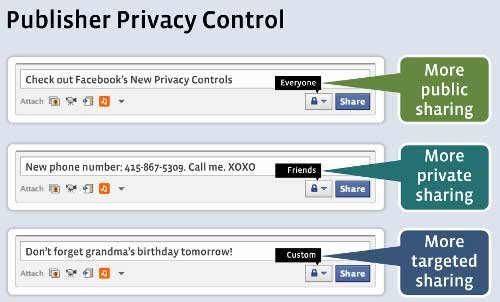
Frankly, we could write an entire book on Facebook privacy. But in the interest of time, we ll mention the major types of privacy you need to be aware of as a Facebook user.
Public profile: You can control the information non friends can see on your public profile. Almost every feature of your profile has an edit option, which allows you to select who can view that information (public, friends only, only you, etc.). Learn more here.
Third party access: In order to use Facebook Open Graph apps like Spotify and Pinterest, those companies need to access certain information on your profile. They ll ask for permissions before you begin using the app. Be aware that each app has different privacy risks. If you don t want that information to be accessible through Facebook s APIs, learn how to turn off access. Similarly, you can also opt out of Facebook social ads the ads that appear to you based on brands your friends like.Facebook privacy can be complicated. See our additional privacy guides for more detailed information:

 Status Updates
 How to Use fb
 Facebook Apps
 Did you ever want to track what your Facebook apps are doing
 Live Chat
 Facebook applications can be anything from virtual pets
 News Feed
 News Feed Ticker Wall Profile Timeline
 The Status Update
 Ticker Appears on the Right
 Internal Messages
 The next page will bring three steps the first one is Find friends
 More ...
 Test your English Language
  Best Sports Team Nicknames krishna Janmashtami Celebration
 President Of India Most Dangerous Animal in the World Best Names at the Sochi Olympics Start the New Year Fresh Most Expensive Divorces In History Animation Tips and Tricks Rainy Day Ideas
 Benefits of Lemon WhatsApp for Beginners
 Precautions while using Securing Email
 Healthy Arms How to Maintain Good Hygiene
 Ajanta Caves Most Influential People in the World Most Intense Sports of the Ancient World Most Luxurious Hotels in the World