


This video basically explains the basic layouts for Facebook
How to Use Social Networking Sites for Beginners



This video basically explains the basic layouts for Facebook
This will explain things such as, how to create a Facebook profile and how to navigate the various tabs and menus on a users profile. The first part of the video explains how to accept and deny friend requests, also it explains how to view your Facebook notifications and how to send and receive personal messages. Towards the middle part of the video, it starts explaining how to find and edit friends. It also will explain how to change your account settings and how to delete your Facebook profile. The closing part of the video starts with, how to post on a friends Facebook wall and also show, how to chat with friends on the Facebook instant messenger. To see this instructional video on the Facebook

 Internal Messages
 First of all you need to be in your home page
 Subscribe
 Facebook Communication System Status Updates
 Brands
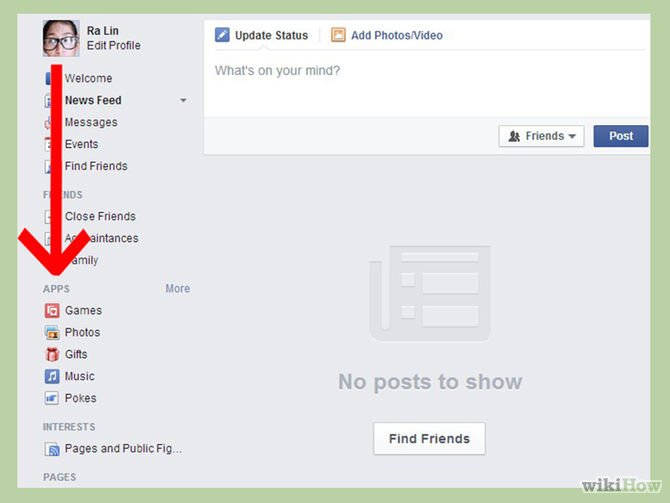
 Did you ever want to track what your Facebook apps are doing
 Privacy
 Ticker Appears on the Right
 How Facebook Timeline Profile Works
 Status Updates
 The second way to locate and keep track of your applications is this easy step
 The next page will bring three steps the first one is Find friends
 More ...
 Test your English Language
  Billiards Pool Game for Beginners Best Gadgets For Summer Travel Weird cars in the world
 Xmas Entertainment Ideas Rules to play Cross Country Running
 Precaution while using Microscope Rules to play Arm Wrestling
 Tips to get ready for Long Drive
 Top High Speed Bullet Trains Interior Design Ideas Fastest Goal in World Cup History
 Rules to play Rubiks Cube Narendra Modi Rules to play Caber Toss
 More Xmas Carols Most Obscure Sports In The World Most Photogenic and breathtaking places in the world Most Player of the Match Award Winners in ODIs