


Reposition your monitor
Healthy Neck



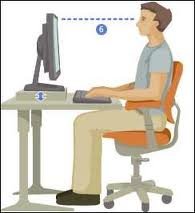
Reposition your monitor
Place your monitor at arms length and make sure the top of your screen is eye level when sitting up straight. (Bifocal users might need a lower monitor.) Center your monitor and keyboard in front of you so you dont twist your neck while typing. If you refer to documents while typing, consider using a document stand to position documents near eye level.

 Strategically place ice on certain areas of the body
 Get a headset for your phone
 Do not sleep on your stomach
 Get a remedial massage
 Center your monitor
 Reposition your monitor
 Dock your notebook
 Customize your chair
 Apply Cold/Heat
 Forward Flexion
 Avoid situations that trigger neck pain
 Check your lighting
 More ...
 Test your English Language
  Rules to play Squash
 Benefits of Cinnamon
 Benefits of Lemon
 Benefits of Pears
 Celebration of Ganesh Chaturthi
 Social Media Networking Sites
 Uncommon Fruits and Veggies Ideas To Improve Student Motivation Best Ways To Drive HighQuality Traffic Best Natural Beauty Tips Enjoy New Year Fashion Trends That Didnt Survive the 90s Surprisingly Scary Short Stories Beautiful Hairstyles Tips Ranking The Best Fighters In The World
 Benefits of Tomatoes
 Benefits of Turmeric
 Benefits of Turnips